A published package is an attack surface you hand to everyone who installs it. If someone can push to your npm package or edit a GitHub release after the fact, they can ship code to your users under your name. Most release pipelines defend that surface with a single long-lived NPM_TOKEN sitting in CI secrets, which is exactly the thing an attacker wants to steal.
I recently set up releases for the Hookie CLI (@hookie-sh/cli on npm) and used three controls that each close a different gap:
- OIDC trusted publishing removes the long-lived npm token from CI entirely.
- Staged npm publishing keeps a human 2FA gate in front of every release, even when CI does the upload.
- Immutable GitHub releases stop a published tag or asset from being changed after it ships.
None of these are hard to enable. The value is that they are independent: OIDC protects the credential, staging protects the moment of release, and immutability protects the artifact after release. This post is how they fit together and where the sharp edges are.
noteThis is not a GoReleaser or full CI tutorial, and it is not a deep dive on provenance or SBOMs. It assumes GitHub Actions and npm. The Hookie CLI is a Go binary distributed through a thin npm wrapper, so the pipeline builds with GoReleaser and then publishes the wrapper to npm; here I focus only on the three security controls.
Long-lived tokens are the weak link
The classic npm publish flow puts an automation token in CI secrets and runs npm publish. That token is long-lived, broadly scoped, and readable by any workflow that can reach the secret. A leaked token, a malicious dependency in the release job, or a compromised third-party action is enough to publish as you. Rotating tokens helps, but the token still exists, and existence is the problem.
Trusted publishing replaces the token with short-lived OIDC credentials. GitHub Actions requests an identity token, npm validates its claims (repository, workflow file, and optionally environment) against a trusted publisher you configured, and issues a one-time publish credential. Nothing long-lived is stored, and the credential only works from the exact workflow you named.
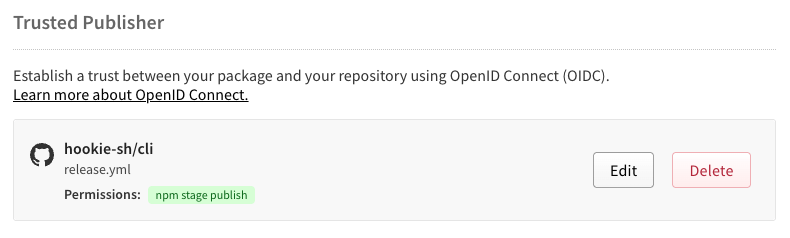
Setup has two halves. First, on npm, open the package settings under Access and add a trusted publisher for GitHub Actions. You enter the organization or user, the repository, and the workflow filename only (release.yml, not the full path). Since May 2026, you also pick which actions the publisher is allowed to perform: npm publish, npm stage publish, or both. I allow stage publish only, which means a direct npm publish from CI is rejected outright.
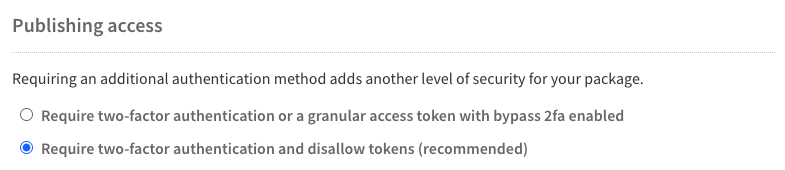
While you are there, set the package publishing access to require two-factor authentication and disallow tokens. This closes the escape hatch: even if an old automation token exists somewhere, it can no longer publish this package.
Second, on the workflow, grant the OIDC permission. Without id-token: write, GitHub Actions cannot mint the token and npm falls back to nothing.
yamlpermissions: contents: write # create the GitHub release id-token: write # mint the OIDC token for npm trusted publishing
There is no NPM_TOKEN anywhere in the workflow. The npm CLI detects the OIDC environment automatically and also emits provenance attestations by default when publishing this way.
warningTrusted publishing only works on GitHub-hosted runners, and each package supports one trusted publisher configuration at a time. The organization, repository, and workflow filename are matched exactly and are case-sensitive; a mismatch fails with an authentication error, not a helpful message.
CI should stage, humans should approve
OIDC solves the credential problem but creates a subtle gap. If CI can publish with no human in the loop, then anything that can trigger CI can ship a release. A pushed tag, a compromised action, or a bad merge becomes a live version on the registry with no second check.
Staged publishing puts that check back. Instead of npm publish, CI runs npm stage publish, which uploads the tarball to a staging queue where it is not installable. The package sits there until a maintainer approves it with a 2FA challenge, from either the CLI or npmjs.com. The design decouples publishing from proof-of-presence: CI does the mechanical upload without needing a secret or a 2FA prompt, and the human provides the 2FA only at approval.
The command surface is small. Two commands you run in CI or to inspect, and a set for review and decision:
| Command | Requires 2FA | Purpose |
|---|---|---|
npm stage publish | No | Upload a version to the staging queue (used in CI) |
npm stage list | No | List staged versions you can act on |
npm stage view | No | Inspect a staged version's details |
npm stage download | No | Download the staged tarball for local inspection |
npm stage approve | Yes | Publish the staged version to the registry |
npm stage reject | Yes | Permanently discard the staged version |
In the Hookie pipeline, CI stages the wrapper and the release summary tells the maintainer how to finish it:
bashPKG="@hookie-sh/cli@${VERSION}" # Idempotent: skip if already published or already staged. npm view "$PKG" version >/dev/null 2>&1 && exit 0 npm stage view "$PKG" >/dev/null 2>&1 && exit 0 npm stage publish --access public echo "Staged $PKG. A maintainer must approve with 2FA before it is installable."
Approval is one command with a 2FA prompt, or a click in the Staged Packages tab on npmjs.com:
bashnpm stage approve @hookie-sh/cli@0.1.0
The gap between staging and approving is also a real testing window. For Hookie I download or install the staged build against a throwaway project before approving, so the 2FA gate is not just a rubber stamp; it is the last point where I can reject a broken build with npm stage reject and nothing ever reaches consumers.
importantStaged publishing requires npm CLI
11.15.0or later and Node22.14.0or later. It also cannot stage a brand-new package: the name must already exist on the registry, so your very first release still goes through a normal publish. And the version tag chosen at staging is immutable; changing it means rejecting and staging again.
A published release should not change
The npm side is now covered, but the GitHub release is a separate artifact with its own risk. By default, a maintainer (or an attacker with write access) can move a tag to a different commit, overwrite an attached binary, or delete and recreate a release. For a CLI where the GitHub release carries the actual binaries, that is a direct path to shipping a swapped artifact under a version people already trust.
Immutable releases, generally available since October 2025, close that. Once enabled, a published release locks its tag to a specific commit and protects its assets from modification or deletion. The tag cannot be moved or reused, and the binaries attached to it cannot be swapped. It even guards against repository resurrection: if you delete the repo and recreate it with the same name, tags tied to old immutable releases cannot be reused.
Enable it under Settings → General → Releases → Enable release immutability (there is an equivalent organization-level policy). One caveat that matters: immutability applies only to releases created after you enable it. Existing releases stay mutable unless you republish them.

How the three controls fit together
The pipeline triggers on a pushed v* tag. Tests run first; nothing publishes if they fail. Then a single release job builds the binaries, creates the immutable GitHub release, and stages the npm wrapper. Approval happens out of band, by a human.
The permissions are the whole security story in five lines:
yamlon: push: tags: - 'v*' permissions: contents: write # create the immutable GitHub release id-token: write # OIDC for npm trusted publishing
I also made the job idempotent, because a security control you cannot safely retry gets disabled the first time it blocks a release at 2am. If the GitHub release already exists, GoReleaser is skipped. If the npm version is already published or already staged, the staging step exits cleanly. Re-running a failed workflow on the same tag does the right thing instead of erroring or double-publishing.
Where the sharp edges are
These controls are cheap, but they are not free of friction, and it is worth naming the tradeoffs before you copy the setup.
- The first publish is manual. You cannot stage a package that does not exist yet, so the initial version goes through a normal publish before staged publishing applies.
- Releases are no longer fully hands-off. By design, someone has to approve with 2FA. That is the point, but it means "push a tag and walk away" no longer ends with a live package.
- Tooling version floors are real. Staged publishing needs npm
11.15.0+ and Node22.14.0+. I added a guard in CI that fails fast if the runner's npm is too old, because the failure mode otherwise is confusing. - Immutability is forward-only. Enabling it does not retroactively protect existing releases, and a mistaken immutable release cannot be edited; you publish a new version instead.
- OIDC constraints are strict. GitHub-hosted runners only, one trusted publisher per package, and exact case-sensitive matching on org, repo, and workflow filename.
For a widely installed package, that friction is the correct trade. The credential never lives in CI, every release passes a human 2FA check, and a shipped artifact cannot be quietly rewritten. Each control fails independently, so losing one does not collapse the others.
- Supply Chain Security
- npm
- GitHub Actions
- CI/CD
- Release Engineering